


Quick Summary
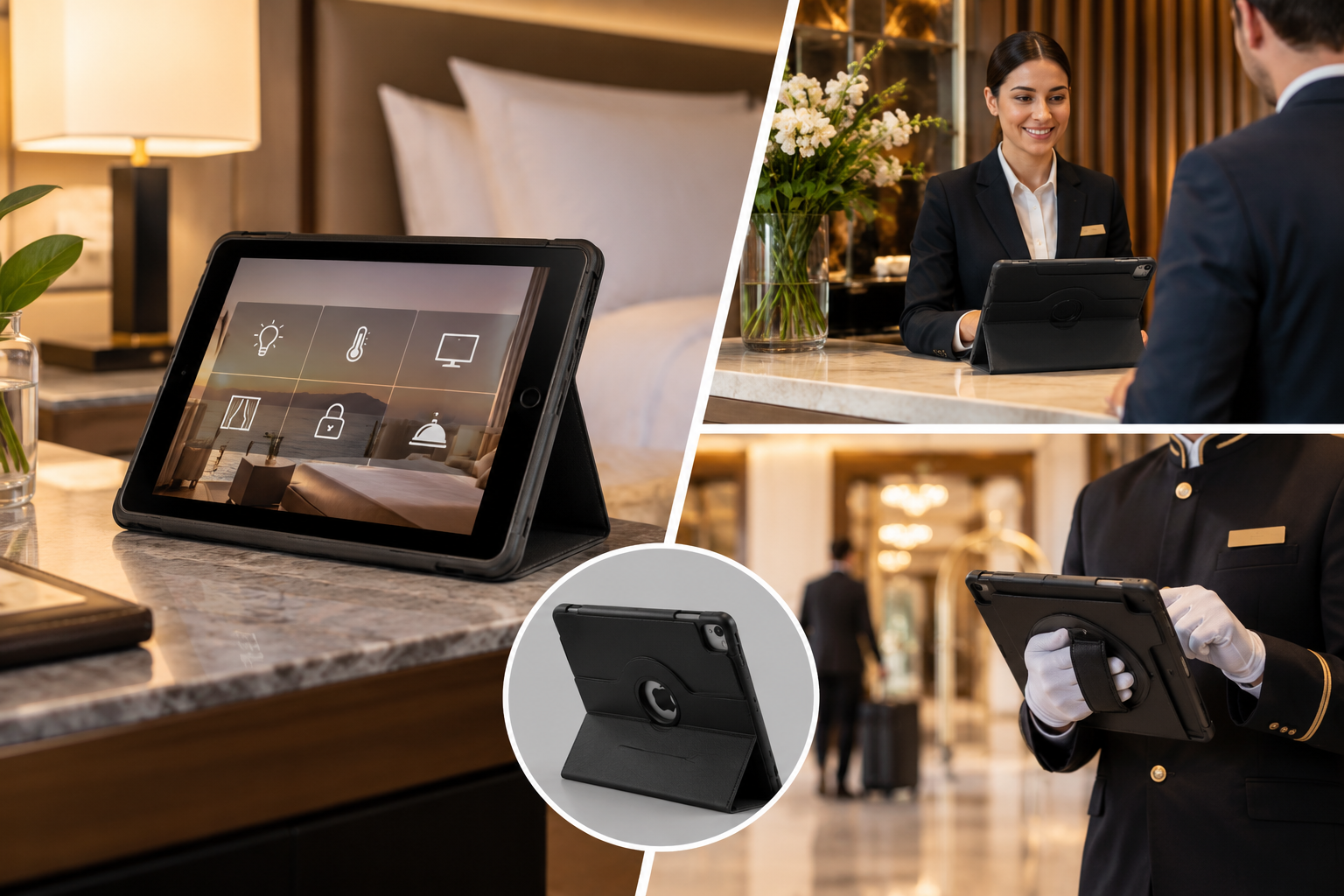
- Hotels use iPads in three main places: guest rooms, the front desk and the concierge or lobby area. Each spot needs a different kind of case.
- In-room iPads need a slim, wipeable case that works with a dock or charger and fits the look of the room.
- Front desk iPads need a steady stand, a secure grip and space for card readers or scanners.
- Concierge and lobby iPads get handled the most, so shockproof corners, hand straps or locked mounts make sense.
- Pick materials that survive the wipes Apple approves. Those are 70 percent isopropyl alcohol wipes, 75 percent ethyl alcohol wipes and Clorox Disinfecting Wipes.
- Brand the case quietly. A debossed or Pantone-matched logo looks like part of the property, not a giveaway.
It is 11 pm. A guest drops their bag, sits on the bed and reaches for the iPad on the nightstand to dim the lights. If the case is sticky, cracked or hard to hold, that small moment feels cheap. If it looks and feels right, nobody notices. That is the goal.
Hotels now run guest requests, room controls, check-in and local tips through tablets. The case around each iPad shapes three things. How long the device lasts. How fast housekeeping can clean it. And how the brand comes across.
This guide walks through what each hotel location needs. Use it to order custom iPad cases for hotels that suit the job.
Where Hotels Use iPads Today
Most properties place iPads in three zones. Some add a fourth for staff.
Guest rooms. In-room tablet platforms such as INTELITY and DigiValet put the room in the guest’s hands. Guests adjust lighting, temperature and shades. They also order dining and send housekeeping requests.
DigiValet lists Raffles Singapore and Wynn Las Vegas among its installs, and it now works with Crestron room control systems. The INTELITY platform integrations page shows how these links work.
Front desk. Agents use iPads for check-in, ID capture, digital registration cards, signatures and upsell offers. Some desks turn the screen toward the guest for signing.
Concierge and lobby. Concierge teams book tables, share maps and show event schedules. Lobby kiosks often run one app only. Apple handles that with Single App Mode on supervised iPads. IT teams set it up with a mobile device management (MDM) tool. Apple now offers device management through Apple Business, which brings together what used to be Apple Business Manager, Apple Business Essentials and Apple Business Connect.
Staff devices. Housekeeping and engineering teams often carry iPads for task lists and room status updates.
As of September 2026, Apple’s range covers iPad, iPad mini, iPad Air 11-inch and 13-inch (M4), plus iPad Pro 11-inch and 13-inch (M5). Cases are cut to exact sizes. A mixed fleet therefore needs more than one case size.
What an In-Room iPad Case Needs
The guest room looks like the calmest setting. It is also where devices change hands most often. Every new guest touches the iPad, and every checkout means a clean.
Easy Cleaning Between Stays
Apple’s cleaning guidance allows a gentle wipe of hard, nonporous surfaces. You can use 70 percent isopropyl alcohol wipes, 75 percent ethyl alcohol wipes or Clorox Disinfecting Wipes. Apple also rules out bleach, aerosol sprays and abrasives, and says to keep moisture out of openings.
That shapes your material choice:
- PU leather and smooth polyurethane wipe clean fast and hold a debossed logo well.
- Polycarbonate hard shells are easy to disinfect and take full-colour UV printing.
- Silicone and TPU grip well but attract lint. Check them after each clean.
- Fabric and felt soak up liquids and are harder to sanitise. Keep them back of house.
- Natural leather looks rich, but frequent alcohol wipes can dry or mark it. Test your cleaning product on a sample first.
Charging Without Removing the Case
Guests will not plug in a tablet that sits out of reach. Housekeeping will not pull 200 iPads out of their cases every week either. So plan the charging method before you order.
- Using a bedside dock? The case needs a cutout that matches the dock connector and angle.
- Using USB-C cables? The port cutout must suit the plug your hotel stocks.
- Wall-mounting devices? Check the case back fits the mount plate.
A Look That Suits the Room
A black rubber case in a soft neutral room looks out of place. A folio that echoes the headboard or desk leather looks planned. Custom leather iPad cases come in PU or real leather. Both can be colour-matched and debossed, so the logo is felt more than seen.
Theft and Loss
Guests do sometimes pack the in-room iPad by mistake. A few simple steps reduce losses:
- Print a short line on the case back, such as “Property of the hotel. Please leave in room.”
- Add an asset number inside the folio flap, so staff can match devices to rooms.
- Use MDM to track devices and turn on Managed Lost Mode for supervised iPads.
- In high-risk spots, use a tethered or locked stand instead of a loose folio.
Front Desk iPad Cases
Front desk iPads work hard during the check-in rush. Staff pass them to guests, turn them for signatures and set them down next to coffee cups.
Look for these features:
- A steady stand. A folio that folds to a firm angle lets guests sign without holding the device.
- Cutouts for accessories. If you use card readers, barcode scanners or ID readers, make sure the case leaves the right ports and edges clear.
- A hand strap. Agents who step out from behind the desk during busy periods need a one-handed grip.
- Reinforced corners. A marble floor is unforgiving. Corner protection matters more than you think.
Executive iPad cases suit desks where presentation matters. Busier resorts often prefer a tough magnetic iPad case. It adds drop protection and still looks tidy.
Concierge and Lobby iPad Cases
Lobby tablets meet the widest mix of users. Children tap them. Guests lean on them. Staff carry them out to the car park to give directions.
For these devices, protection comes first:
- Shockproof EVA foam or rubberised bumpers for drops
- Raised edges around the screen
- A hand strap or shoulder strap for staff who move around
- A locked floor or counter stand for unattended kiosks
- A screen protector to reduce scratches from rings and keys
Our guide to folio vs rugged tablet cases explains the trade-offs in more detail.
Hotel iPad Case Comparison by Location
| Location | Main job | Best case style | Must-have features | Branding approach |
|---|---|---|---|---|
| Guest room | Room controls, dining, requests | Slim folio or hard-back magnetic case | Wipeable surface, dock or charger access, colour to match room | Tone-on-tone deboss or small print |
| Front desk | Check-in, signatures, upsells | Executive folio with stand | Stable angle, accessory cutouts, hand strap | Debossed logo on the cover |
| Concierge desk | Bookings, maps, local tips | Tough magnetic or shockproof case | Corner protection, strap, raised edges | Pantone-matched print |
| Lobby kiosk | Single-app self-service | Locked enclosure or rugged case on a stand | Theft resistance, screen protection | Printed logo on the stand or case back |
| Staff devices | Housekeeping and maintenance tasks | Rugged shockproof case | Strap, easy cleaning, asset number | Colour-coded by department |
Example Deployments
The three example setups below are illustrative. They show how case needs change with the type of property.
A 180-room city business hotel. The team wants a clean look and fast turnover. Guest rooms get black PU leather folios with a debossed logo. The front desk gets four executive folios with stands. Housekeeping iPads get rugged cases in a second colour, so nobody mixes them up.
A beach resort with pool cabanas. Sun, sunscreen and wet hands are the real risks here. Apple designs iPads for use between 0 and 35 degrees Celsius (32 to 95 degrees Fahrenheit). Poolside heat can pass that in summer. So the resort picks light-coloured rugged cases with straps, and keeps cabana iPads in shaded, airy stands.
A boutique hotel with a small concierge desk. Only six devices, but every one of them faces a guest. The owner picks real leather folios colour-matched to the lobby furniture. The hotel mark is foil-stamped on the cover.
How to Brand Hotel iPad Cases Without Looking Like Merchandise
Hotels spend years building a brand. A loud, full-colour logo on every surface works against that. A few habits help:
- Follow your brand standards. Share the exact Pantone references from your guidelines. That way the case matches your signage and stationery.
- Go small. A logo across a quarter of the cover looks richer than one that fills it.
- Use texture. Debossing on PU leather gives a quiet, upmarket feel.
- Keep notices apart. Put “please leave in room” text on the back, away from the logo.
- Send clean artwork. Vector files make the process faster. See our guide on preparing logo artwork for custom cases.
Ordering Checklist for Hotel iPad Cases
- Count devices by location and exact iPad model.
- Check each model name in Settings, then General, then About.
- Choose docks, mounts and chargers before you pick a case.
- Test your housekeeping wipe on a material sample.
- Check logo size, placement and Pantone colours against brand guidelines.
- Approve a physical sample before the full run.
- Order spares for damage and new devices.
At CustomLogoCases, you see and approve a real production sample within 7 to 10 days of placing your order. That gives operations and brand teams time to check fit and finish together. To start, request pricing with your device list.
Frequently Asked Questions
What is the best iPad case for hotel rooms?
A slim folio or hard-back magnetic case suits most guest rooms. Wipeable PU leather and polycarbonate both work well. The case should allow charging without removal, match the room colours and carry a small, quiet logo.
Can hotel staff disinfect iPad cases?
Yes, if the material suits it. Apple allows 70 percent isopropyl alcohol wipes, 75 percent ethyl alcohol wipes and Clorox Disinfecting Wipes on hard, nonporous surfaces. PU leather and hard plastics cope well with this. Test natural leather and fabric first.
How do hotels stop guests from taking in-room iPads?
Most hotels use four things together: clear “please leave in room” printing, asset numbers, MDM tracking and Managed Lost Mode. Busy public areas often use locked stands or enclosures instead of loose cases.
Do custom iPad cases fit every iPad model?
No. Each case is built for set dimensions, camera positions and button layouts. Confirm the exact model for every device before you order. This matters most when your fleet mixes iPad, iPad Air and iPad Pro units.
How long does a custom hotel iPad case order take?
Timelines depend on quantity, material and branding method. With CustomLogoCases, the production sample arrives within 7 to 10 days of ordering. Full production follows once you sign off.
Final Thoughts
An in-room iPad is one of the few things every guest touches. The right case keeps it clean, charged and in one piece. It also carries your brand quietly from the nightstand to the front desk.
Start with where each device lives and who handles it. Then choose materials and branding to match. For help across a full property, the team at Custom Logo Cases works with hospitality buyers on custom iPad cases built for daily use.

Bhushan spent the last 15+ years building businesses and learning what really matters to customers. At Custom Logo Cases, we help brands turn everyday tech accessories into high-quality, on-brand marketing tools.

... See MoreSee Less
Neoprene Sleeve with Handles, 4-Ply Padding and two Velcro pockets. #newlogoalert🚨 #rebrandmerch #staffgifts #teamgifts #laptopbags ... See MoreSee Less
... See MoreSee Less